


Code It All
A fun and very informative video tutorial covering a number of FPE topics
 Download
 Support FPE

Instant Game Mechanics from Blender to Godot
Tag gameplay in Blender, export standard GLTF, and open playable Godot scenes with players, triggers, speakers, inventory items, scene metadata, animation events, and more.
Setup
Install the Blender addon, then enable the Godot plugin.
Community Media
A fun and very informative video tutorial covering a number of FPE topics
A full tutorial video and write-up
Fund ongoing FPE development
Folded Paper Engine stays free, open-source, and MIT licensed. Support helps fund ongoing maintenance, docs, tutorials, sample projects, and the first official showcase game. Support helps keep instant Blender-to-Godot game mechanics free, maintained, documented, and backed by real showcase projects.
Ko-fi is the easiest way to support FPE. GitHub Sponsors is available for open-source/dev-focused support.

Learn the toolchain
 Folded Paper Engine Blender Panel Docs Author gameplay metadata where your level already lives.
  Folded Paper Engine Godot Feature Docs See how imported scene data becomes runtime behavior.
  Folded Paper Engine Godot API Index Reference the scripts and extension points behind FPE.
  Tutorials Follow guided videos for practical Blender-to-Godot workflows.
 Make pretty art into pretty games
This informative Blender-to-Godot guide library shows how to turn the places, props, animation, and atmosphere you already create into playable Godot mechanics. Start with artist-friendly Blender recipes, then follow the engineering path as your game grows.
Browse All Blender-to-Godot GuidesA standard export, made smarter
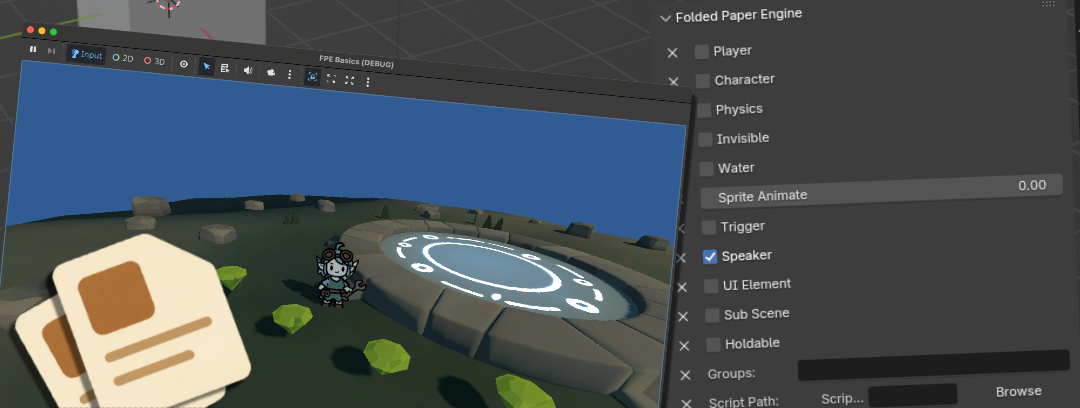
Use FPE panels to mark Players, Triggers, Speakers, Holdable Items, and scene settings.
FPE carries custom properties through Blender's existing GLTF export without a custom format.
Add the FoldedPaperEngine node and let the addon enhance imported nodes with the behaviors you tagged.
Blender scene data, Godot runtime behavior
Folded Paper Engine turns Blender-authored scene metadata into Godot game mechanics. Use Blender panels to tag players, triggers, physics objects, speakers, inventory items, scene transitions, animation events, and other gameplay behavior. Export standard GLTF, then let the Godot addon load the scene and wire the runtime behavior.
The goal is not to replace Godot development. FPE removes repetitive setup so artists, designers, and programmers can iterate on playable scenes faster.
Because the data travels through standard GLTF custom properties, the same GLTF gameplay metadata can support Blender to Godot game mechanics, quick Godot gameplay prototyping, and later custom runtime scripts.
Built for repeated level work
Configure rigs, NPCs, camera behavior, and player-facing metadata directly on scene objects.
Define area triggers, command catalogs, scene events, and animation frame events in the authoring file.
Mark holdable items, inventory objects, rigid bodies, and collider behavior before export.
Carry sky color, sub-scenes, loading behavior, UI elements, and scene metadata into Godot.
Set up music imports, looping, autoplay, background tracks, and speakers as part of level authoring.
Override generated behavior, add custom scripts, or extend FPE's modular runtime when a scene needs more.
For artists, designers, solo developers, and teams
Artists can build interactive scenes without touching code. Programmers can rely on FPE for repetitive setup, then customize the unique parts. Teams get a cleaner handoff from Blender-authored levels to the Godot runtime.

Pack for your adventure
Install both sides of the workflow: Blender authoring panels and the Godot runtime addon.